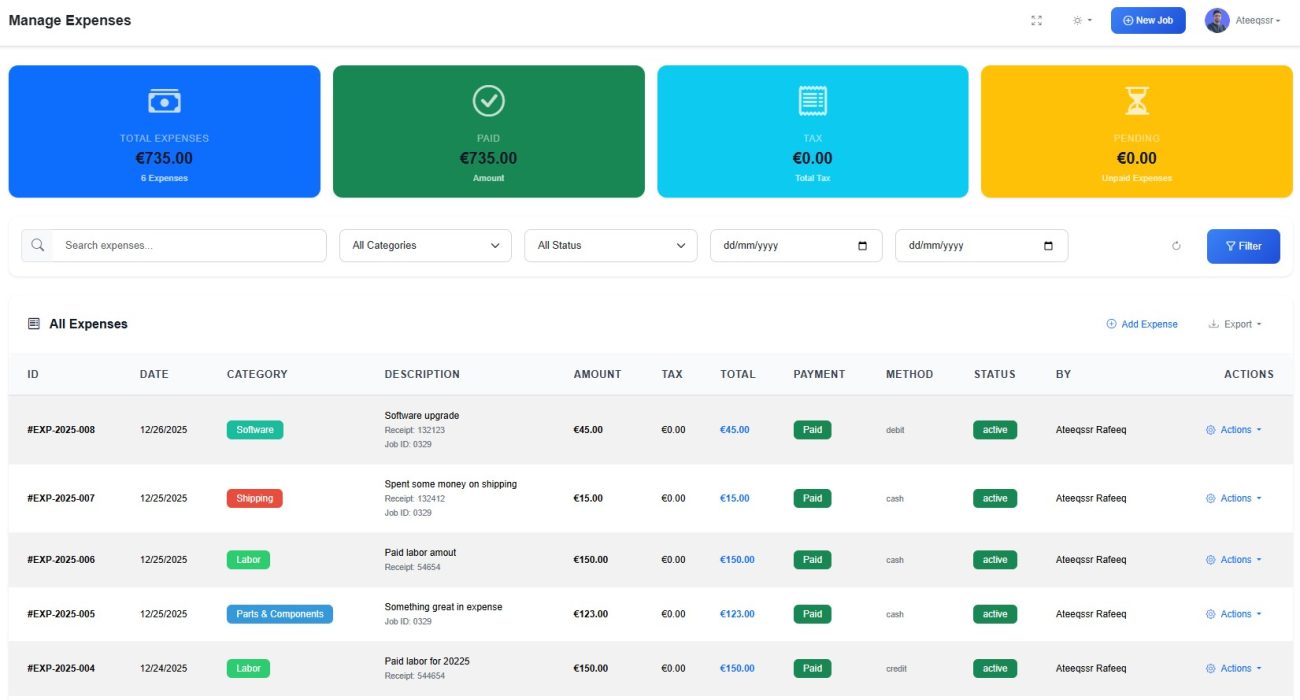
Running a successful repair business is not just about completing jobs — it’s about knowing your real profit. Many repair shops track revenue but fail to accurately record expenses, leading to unclear margins and poor financial decisions.
The RepairBuddy Expense Module solves this problem by giving repair shops a powerful, job-linked expense tracking system designed specifically for service-based industries.
Whether you run a mobile repair shop, computer repair business, electronics service center, automotive workshop, or field service company, RepairBuddy helps you track job expenses and general business expenses in one unified system.
Why Expense Tracking Is Critical for Repair Shops
Most repair businesses face these challenges:
- Parts purchased outside inventory are forgotten
- Technician labor cost is not tracked properly
- Outsourced repairs eat profit silently
- Revenue looks high, but profit stays low
- Accounting tools are disconnected from jobs
RepairBuddy fixes this by linking expenses directly to repair jobs, technicians, and services.
What Is the RepairBuddy Expense Module?
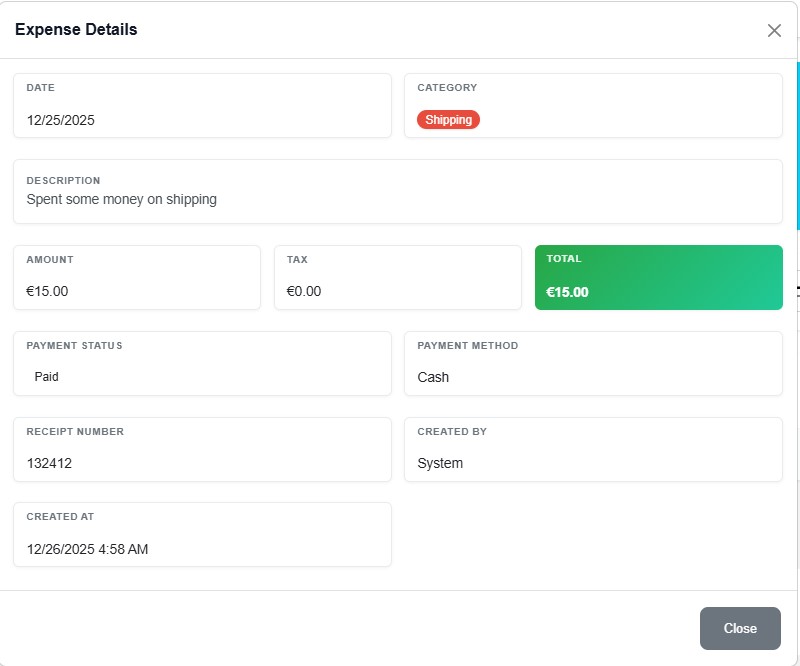
The Expense Module in RepairBuddy allows you to:
- Record job-related expenses
- Track general operational expenses
- Categorize, tax, and analyze costs
- Calculate true job profitability
- Make smarter pricing and staffing decisions
Unlike generic accounting software, RepairBuddy is built specifically for repair shops.
Job-Based Expense Tracking (The Game Changer)
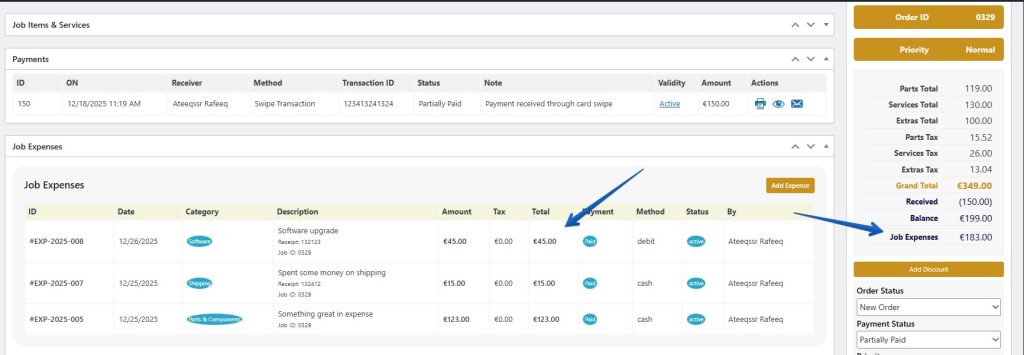
🔧 Record Expenses Directly Against Jobs
Each expense can be linked to a specific repair job (rep_jobs), giving you unmatched clarity.
Examples of job expenses:
- Replacement parts purchased externally
- Technician labor costs
- Outsourced repairs
- Travel or pickup costs
- Emergency or rush service costs
Once recorded, these expenses are automatically tied to:
- Job ID
- Technician
- Customer
- Device
- Service
➡️ This allows you to instantly see how profitable each repair job really is.
General & Operational Expense Tracking
Not all expenses belong to a specific job — and RepairBuddy handles that perfectly.
Track general expenses such as:
- Shop rent
- Utilities
- Tools and equipment
- Software subscriptions
- Marketing and advertising
- Office supplies
You can classify expenses as:
- General
- Operational
- Business
- Personal (for separation and reporting)
This makes RepairBuddy suitable not just for technicians, but also for owners and managers.
Smart Expense Categories with Tax Support
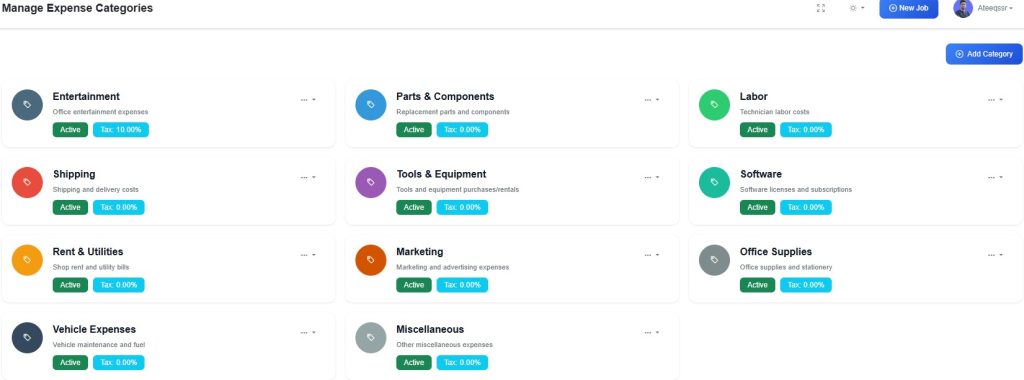
📂 Organized Expense Categories
RepairBuddy includes a full expense category system:
- Create unlimited expense categories
- Enable or disable categories
- Assign colors for visual reports
- Set tax rules per category
- Apply tax rates automatically
This is ideal for businesses operating in VAT, GST, or sales-tax regions.
Automatic Expense Calculations
Every expense in RepairBuddy automatically calculates:
- Base amount
- Tax amount (if applicable)
- Total expense value
This ensures:
- No manual math errors
- Accurate reporting
- Clean data for accounting
Payment Methods & Payment Status Tracking
Each expense can record:
- Payment method (cash, card, bank transfer, PayPal, online, etc.)
- Payment status (paid, pending, partial, overdue)
This helps shop owners track:
- Outstanding payments
- Cash flow issues
- Reimbursements
Receipt Attachments & Reference Numbers
For professional record-keeping and audits, RepairBuddy allows you to:
- Attach receipts
- Store invoice numbers
- Add internal notes
- Keep digital proof of expenses
Perfect for accounting, tax filing, and compliance.
Technician & User-Based Expense Control
RepairBuddy supports role-based access:
- Technicians can record job expenses
- Store managers can review and approve
- Admins get full visibility and control
Expenses can be filtered by:
- Technician
- Job
- Category
- Date range
- Payment status
Expense Reports & Business Insights
📊 Built-in Expense Analytics
RepairBuddy provides powerful expense reporting:
- Total expenses by month, week, or year
- Expense breakdown by category
- Job-wise expense comparison
- Technician-wise cost analysis
- Tax vs non-tax expenses
These insights help repair shop owners:
- Identify high-cost services
- Optimize pricing
- Reduce unnecessary spending
- Improve margins
Real Profit Calculation (Revenue – Expenses)
RepairBuddy already tracks job revenue through services, parts, extras, and time logs.
By adding the Expense Module, you unlock:
- Real job profit calculations
- Cost vs revenue visibility
- Accurate financial decisions
➡️ This turns RepairBuddy into a complete repair business management system, not just a job tracker.
Perfect for Multiple Repair Industries
The Expense Module is designed to work across industries, including:
- Mobile phone repair shops
- Computer & laptop repair businesses
- Electronics & gadget repair
- Automotive & bike repair workshops
- Field service & on-site repair companies
- Appliance repair services
- Jewelry Repair Shop Services
Thanks to custom device types and services, the system adapts easily to any repair workflow.
How RepairBuddy Stands Out from Other Repair Software
Most repair shop software:
- Tracks revenue only
- Relies on external accounting tools
- Doesn’t link costs to jobs
RepairBuddy:
- Tracks job-level expenses
- Tracks business-level expenses
- Calculates real profitability
- Keeps everything inside WordPress
- Gives full data ownership
Final Thoughts: Why Every Repair Shop Needs This Module
If you’re serious about growing your repair business, tracking revenue alone is not enough.
The RepairBuddy Expense Module gives you:
- Full financial visibility
- Better profit margins
- Smarter pricing
- Stronger business control
It transforms RepairBuddy from a repair management tool into a complete repair business operating system.
👉 Ready to Track Real Profit?
If you already use RepairBuddy, enable the Expense Module today and start making data-driven decisions that actually grow your business.