
Managing payments is one of the most frustrating parts of running a repair shop. Customers pay in different ways, payments are often split, and keeping track of balances becomes messy very quickly.
Many repair shop owners still rely on notebooks, spreadsheets, POS slips, and emails just to know who paid, how much, and what is still due. This not only wastes time but also leads to mistakes, delayed payments, and unhappy customers.
In this article, we’ll show how RepairBuddy helps repair shops accept cash, partial, and online payments — all in one centralized system.
Key Takeways
To accept partial payments in a repair shop, you need a system that logs deposits, tracks remaining balances, and integrates with your POS. RepairBuddy automates this by linking offline cash payments and online WooCommerce links in one dashboard. Also makes it easy for you to filter the jobs which aren’t fully paid. Also ability to provide payment receipt until the invoice is not complete?
The Common Payment Problems Repair Shops Face
If you run a repair business, chances are you’ve experienced at least one of these issues:
- Customers paying partially upfront and the rest later
- Mixing cash, card, and bank transfer payments
- No clear payment status for jobs
- Manual receipt writing
- Chasing customers for pending balances
- Using separate tools for invoicing and payments
These problems grow as your business scales.
How RepairBuddy Solves Repair Shop Payment Chaos
RepairBuddy is a WordPress-based repair shop management plugin designed specifically for service and repair businesses. Its payment system is built to handle real-world repair workflows.
1. Accept Offline Payments with Full Control
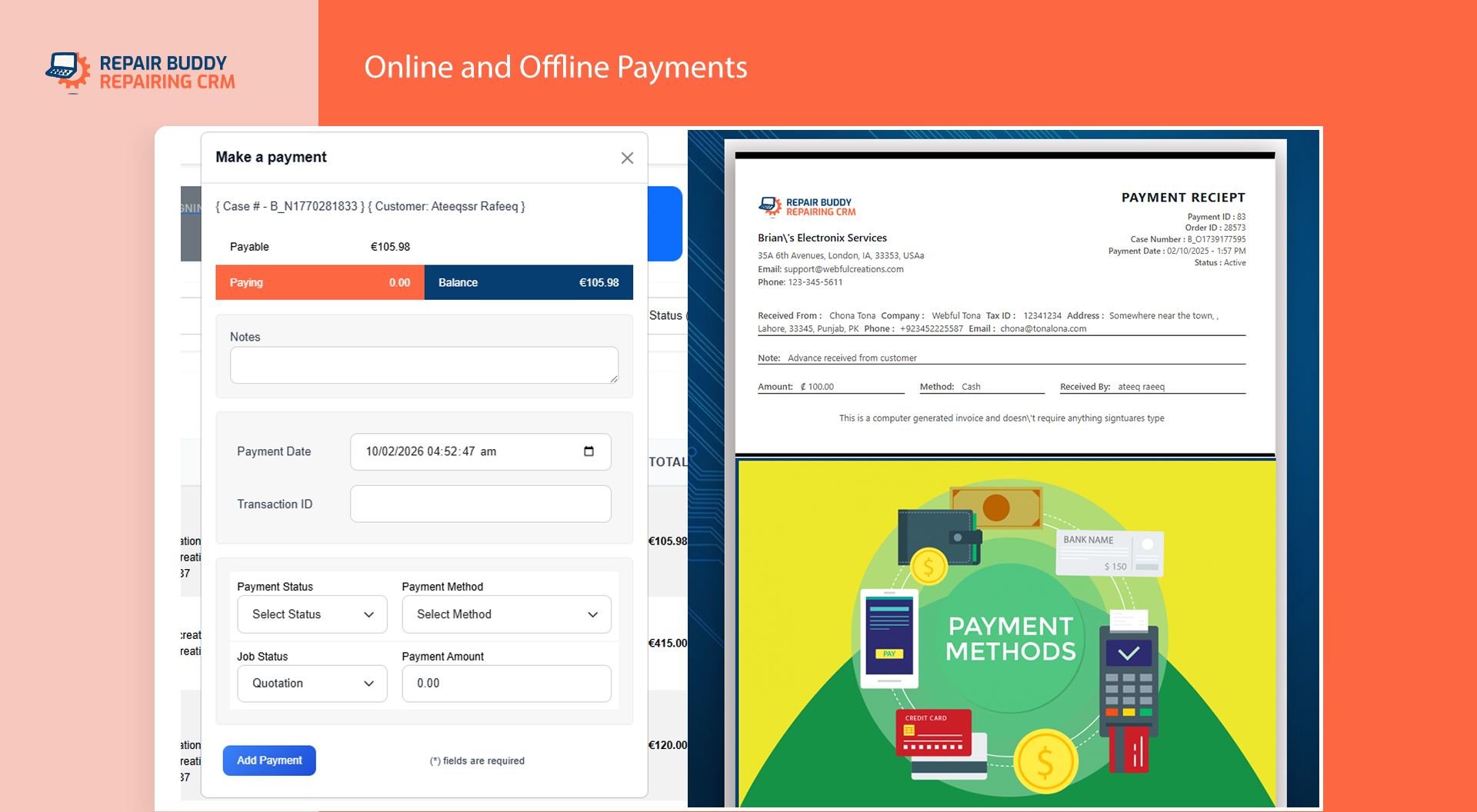
When a customer is in your repair shop you just need to quickly create their job, receive upfront a partial payment. RepairBuddy allows you to record and manage offline payments directly from the job screen, including:
- Cash payments
- Check payments
- Swipe / POS transactions
- Bank transfers
- Any custom offline method you need
Each payment is saved against the job, ensuring nothing gets lost or forgotten. RepairBuddy’s Repair Shop Payments Integration System is capable of handling offline and online both types of payments.
2. Handle Partial Payments Without Confusion
Partial payments are extremely common in repair businesses. RepairBuddy lets you:
- Accept deposits before starting work
- Split payments across multiple transactions
- Automatically calculate remaining balances
- View paid vs due amounts at a glance
Every partial payment is logged separately, creating a clear and transparent payment history.
3. Custom Payment Statuses for Better Workflow
Not every payment fits into a simple “paid” or “unpaid” category.
With RepairBuddy, you can create custom payment statuses such as:
- Unpaid
- Partially Paid
- Paid
- Credit
- Check Pending
- Refunded
These statuses help your staff instantly understand whether work can proceed or if a device can be released.
4. Generate Online Payment Links Using WooCommerce
For customers who prefer paying online, RepairBuddy integrates seamlessly with WooCommerce.
From any job, you can:
- Generate a secure online payment link
- Send it to the customer via Email or SMS
- Include a professional invoice automatically
Customers can pay from their phone or computer, making the payment process faster and more convenient.
5. Automatic Job & Payment Status Updates
Once an online payment is completed:
- The job payment status updates automatically
- The remaining balance is recalculated
- No manual data entry is required
This automation reduces errors and saves valuable time for shop owners and staff.
6. Complete Payment History in One Place
RepairBuddy keeps a detailed payment history for every job and customer:
- View all transactions in one dashboard
- Filter by date, payment method, or status
- Export payment data when needed
This makes bookkeeping, audits, and reporting much easier.
7. Professional Payment Receipts
Every payment — full or partial — generates a professional payment receipt:
- Printable in-store
- Downloadable as PDF
- Email-ready for customers
Receipts clearly show paid amounts, remaining balances, and payment methods, building trust and transparency.
Why This Matters for Repair Shop Owners
By using RepairBuddy’s unified payment system, repair shops benefit from:
- Faster payment collection
- Fewer accounting mistakes
- Clear job-level payment visibility
- Better customer experience
- Less time spent on manual tracking
Instead of chasing payments, you can focus on repairs and growing your business.
Who RepairBuddy Is Built For
RepairBuddy is ideal for:
- Phone repair shops
- Auto repair shops
- Computer repair businesses
- HVAC and service businesses
- Electronics and equipment repair shops
If your business accepts multiple payment types, RepairBuddy is designed for you.
Get Started with RepairBuddy
If you want to simplify how your repair shop handles cash, partial, and online payments, RepairBuddy gives you everything in one powerful system.
👉 Get RepairBuddy here: https://www.webfulcreations.com/repairbuddy-wordpress-plugin/
Stop juggling tools. Start getting paid smarter.
Frequently Asked Questions (FAQ) – Repair Shop Payments
Can a repair shop accept both cash and online payments?
Yes. Repair shops commonly accept a mix of cash, card, bank transfer, and online payments. RepairBuddy allows you to manage all payment types in one system, so every transaction—offline or online—is tracked against the job.
How do partial payments work in RepairBuddy?
RepairBuddy allows you to accept deposits or split payments easily. Each partial payment is recorded separately, the remaining balance is calculated automatically, and the job always shows the correct payment status.
Can customers pay online without visiting the repair shop?
Yes. RepairBuddy lets you generate secure online payment links using WooCommerce. Customers can pay from their phone or computer, even before pickup or delivery.
Does RepairBuddy send invoices automatically?
Yes. When you generate an online payment link, RepairBuddy includes a professional invoice that can be sent via email or SMS. This helps customers understand exactly what they are paying for.
Are payment receipts generated automatically?
Yes. Every payment—full or partial—creates a professional receipt. Receipts can be printed, downloaded as PDF, or emailed to customers for their records.
Can I customize payment statuses for my repair workflow?
Absolutely. RepairBuddy allows you to create custom payment statuses such as Partially Paid, Check Pending, Credit, or Refunded. This gives your staff instant clarity on payment progress.
What happens when a customer pays online?
Once an online payment is completed, RepairBuddy automatically updates the job’s payment status and balance in real time. No manual updates are required.
Is WooCommerce required for offline payments?
No. WooCommerce is only needed for online payments. Offline payments like cash, check, or bank transfer can be managed directly inside RepairBuddy without WooCommerce.
Is RepairBuddy suitable for small repair shops?
Yes. RepairBuddy is designed for both small and growing repair shops. It simplifies payments, reduces manual work, and scales as your business grows.
What types of repair businesses can use RepairBuddy?
RepairBuddy works well for phone repair, auto repair, computer repair, HVAC, electronics repair, and other service-based repair businesses.
Final Thoughts
Handling payments doesn’t have to be complicated. By combining offline payments, partial payments, online payment links, automatic receipts, and real-time status updates, RepairBuddy gives repair shop owners a complete and reliable payment system—all inside WordPress.