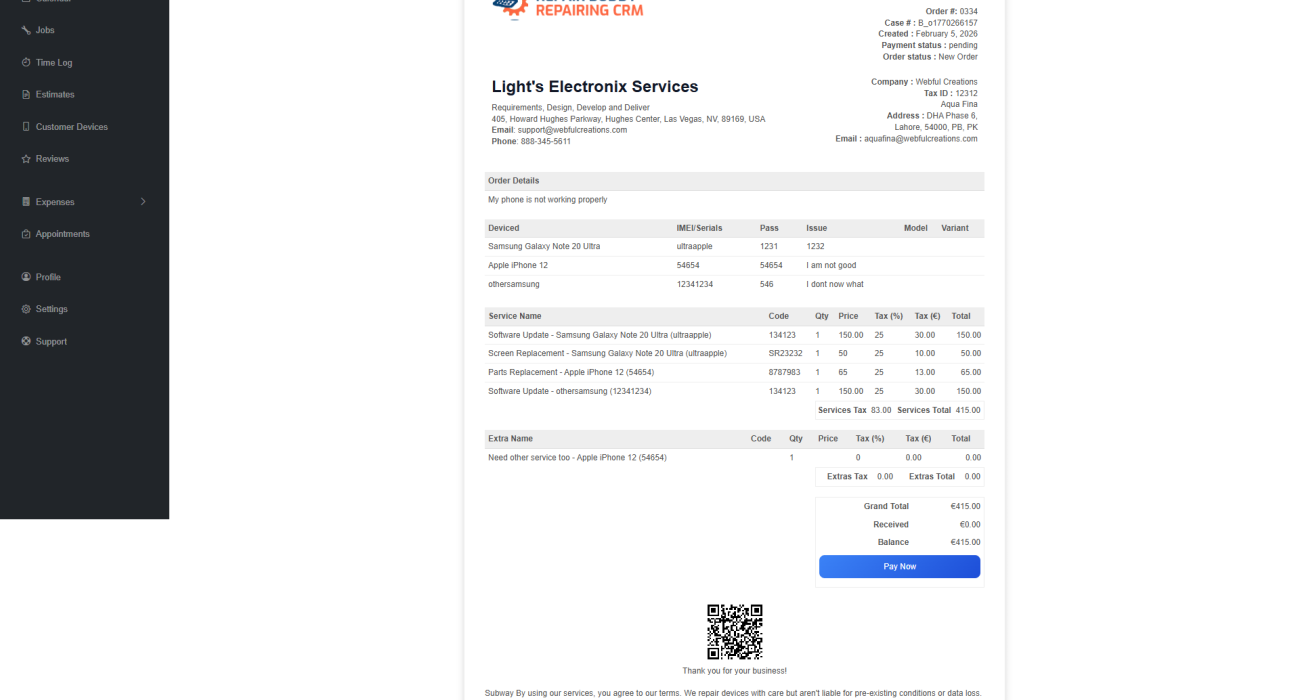
Every repair business has it’s unique workflow and their requirements for invoicing tools for repair services can be different. For example one of our floor light repair business customer receives the devices by UPS Courier service, after analyzing the device they send upfront request to customer so customer can pay that online. Similarly their requirement to send final invoice to customer when device is ready to ship. RepairBuddy doesn’t only help them add the shipping price in invoice, but also make sure the printed invoice have pay now button For customer to pay without any confusion or problem.
If you run a repair shop, invoicing isn’t just about sending a bill. It’s keeping track of complete job history, technicians who worked on job, hours spent on job and everything related so the final invoice isn’t just an invoice but a complete repair log.
It’s about:
- Tracking job-based billing
- Managing partial payments
- Handling taxes correctly
- Connecting payments to repairs
- Giving customers online invoice access
- Maintaining accurate financial records
Many repair businesses start with generic invoice software — only to realize it doesn’t fit their workflow. They may forget to add technician hours, or a specific part or labor to job or even worse, they forget to collect the balance.
In this guide, we’ll explain:
- What makes a great invoicing tool for repair services
- Why general invoice apps don’t work well for repair shops
- Key features every repair business invoice system must have
- Why specialized repair shop invoicing software performs better
- The best solution built specifically for repair businesses
Why Repair Shops Need Specialized Invoicing Tools
A repair business works differently from most service businesses. For example let’s compare with website hosting business, Where on a fix date of month the payment is collected and an invoice is issued to customer similar requirements are for schools, gyms and other businesses. But repair business let’s say if customer ships device to business, first need to analyze the device and figure out what it will take which services, parts or extras to complete the job and then send estimate to customer for approval. Customer pays some upfront and then final amount on device delivery. But what if the device is not repairable? In that case business have to return device to customer and charge them diagnostic and shipping charges.
So from creating jobs to adding parts, services, issuing partial payment receipts to final payment request and then issue the final invoice.
Unlike standalone invoice generators, RepairBuddy connects invoicing directly with its complete repair booking system — meaning jobs, estimates, invoices, and payments all operate inside one centralized repair workflow.
You don’t just issue invoices. You:
- Create jobs
- Add parts
- Add labor
- Apply multiple taxes
- Offer estimates first
- Collect deposits or partial payments
- Update job status
- Sometimes process warranty claims
- Occasionally issue refunds
Generic invoicing tools don’t understand job-based workflows.
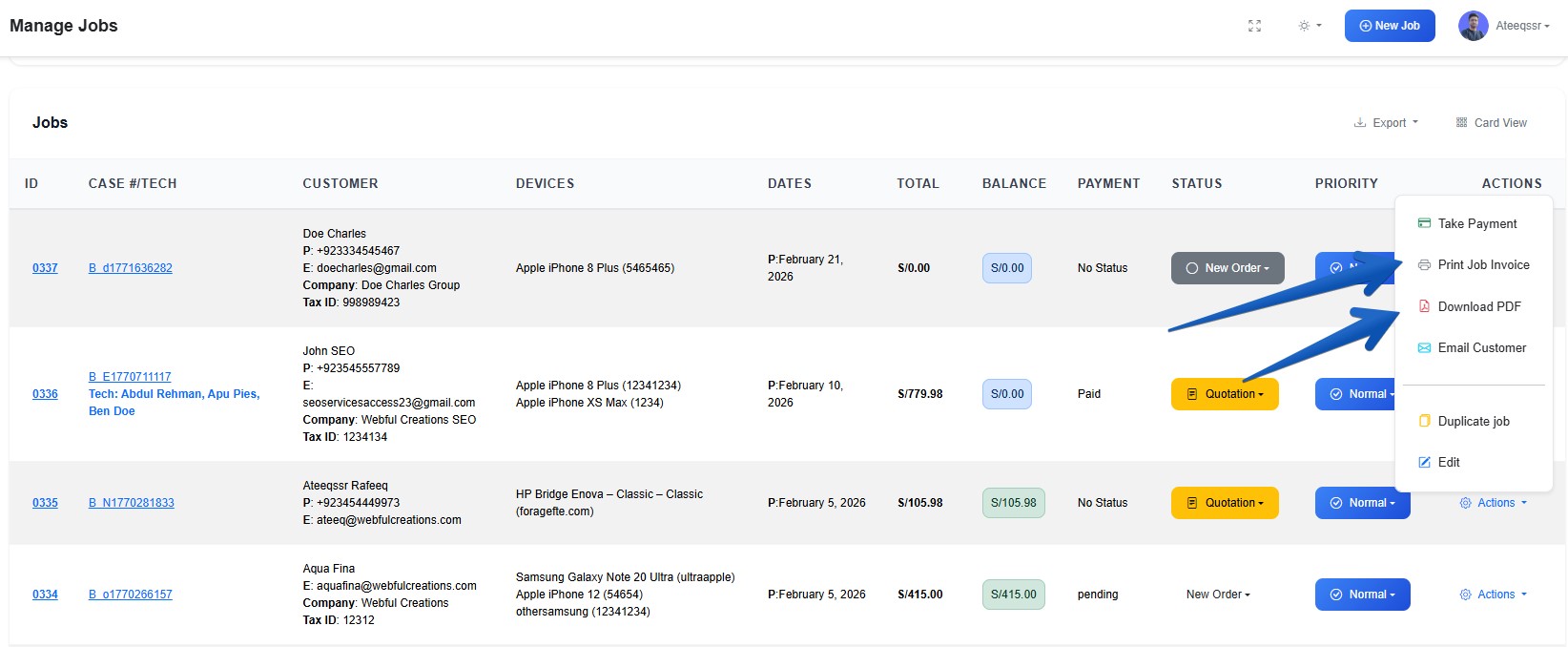
That’s where repair-specific invoicing tools come in. And RepairBuddy is able to receive online, offline payments partial full as well. Providing you complete set of invoices and payment receipts.
What to Look for in Invoicing Tools for Repair Services
Here are the must-have features for every repair shop to make their workflow more automated and robust:
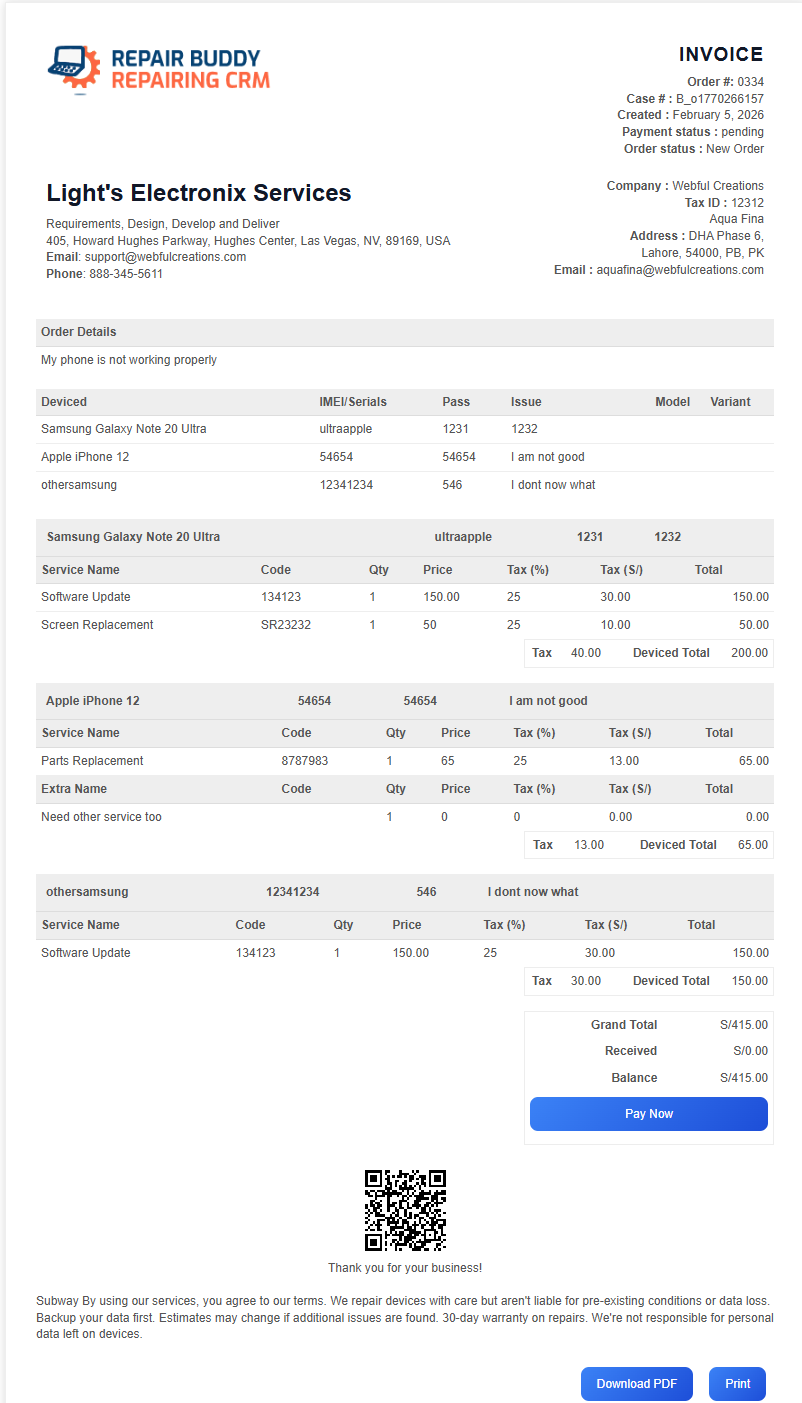
1. Custom Invoice Numbers
Repair shops often need structured invoice numbering for accounting and compliance.
A good repair shop invoicing software should allow:
- Custom invoice numbers
- Sequential numbering
- Automatic linking to repair jobs
2. Flexible Tax Handling (VAT / GST)
Since RepairBuddy provides inclusive and exclusive both types of taxes. We have seen for various countries where the tax rate applied to Parts is different than the tax rate applied to labor. So RepairBuddy enables you to utilize the multiple tax rates in both exclusive and inclusive forms.
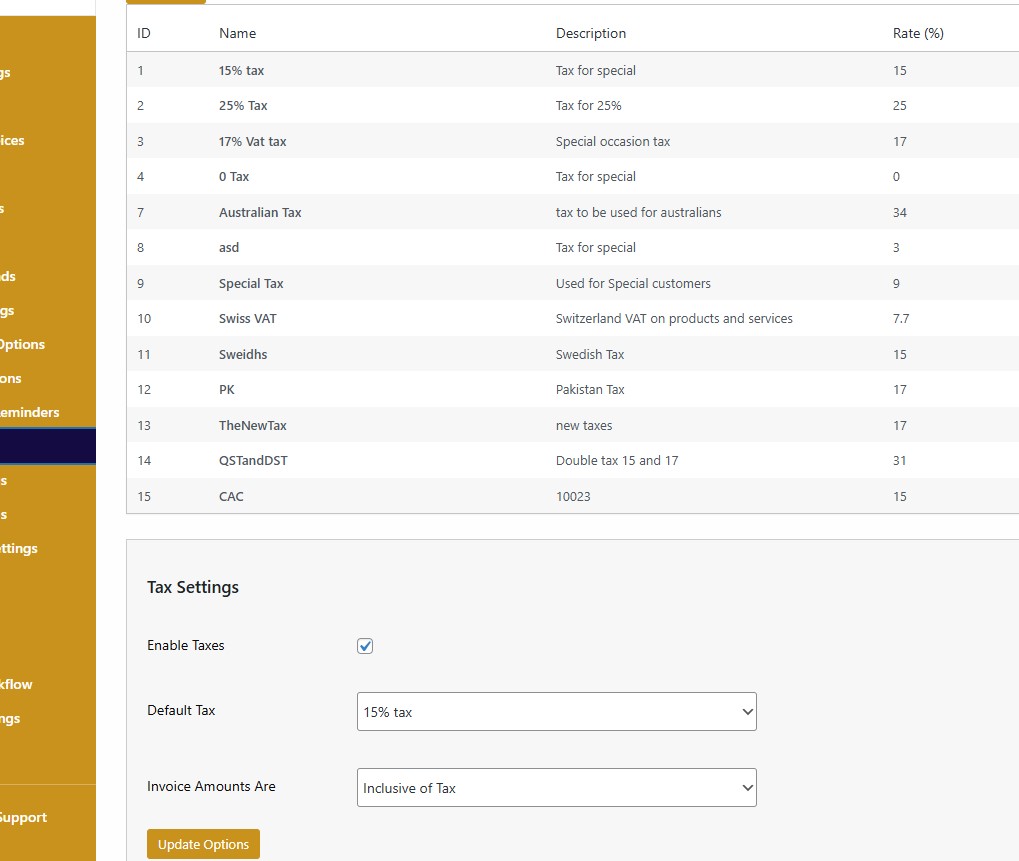
Repair businesses may require:
- Multiple tax rates
- Inclusive tax pricing
- Exclusive tax pricing
- Default tax settings
- Job-specific tax adjustments
Without flexible tax control, accounting becomes messy.
3. Job-Based Invoice Attachment
Invoices should automatically attach to:
- Specific repair jobs
- Customer records
- Payment logs
A proper repair business invoice system connects invoices directly to job tickets. And keep track of each payment as repair jobs can have several payments during the process.
4. Partial Payments & Deposits
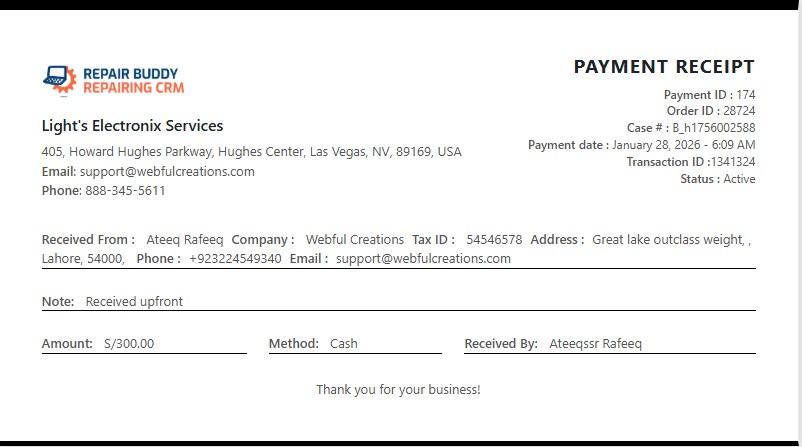
Repair shops often collect:
- Advance payments
- Deposits
- Installment payments
- Remaining balance upon pickup
The system must track:
- Paid amount
- Pending amount
- Payment history
- Status updates (Paid / Partial / Pending)
5. Payment Link Inside Invoice
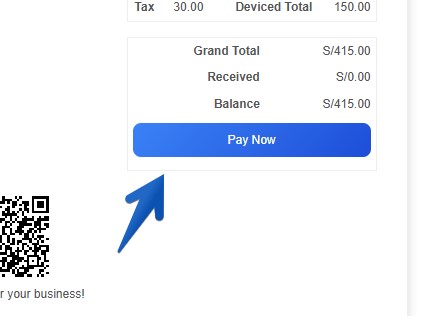
Modern customers expect to:
- Click a payment link
- Pay instantly online
The payment link should:
- Automatically disappear once paid
- Update invoice status to Paid
- Sync with payment records
6. Printable & Downloadable PDF Invoices
Repair businesses need:
- Printable job invoices
- Downloadable PDFs
- Customer portal access
- Access through repair status checker
7. Automatic Email Invoices
Also the attachment send the payment link if the customer have payable balance it can get paid fast through various online channels. Customer can click Pay now button on invoice, in email, through SMS or just scan the QR code sent to them to complete their payment and receive final invoice automatically.
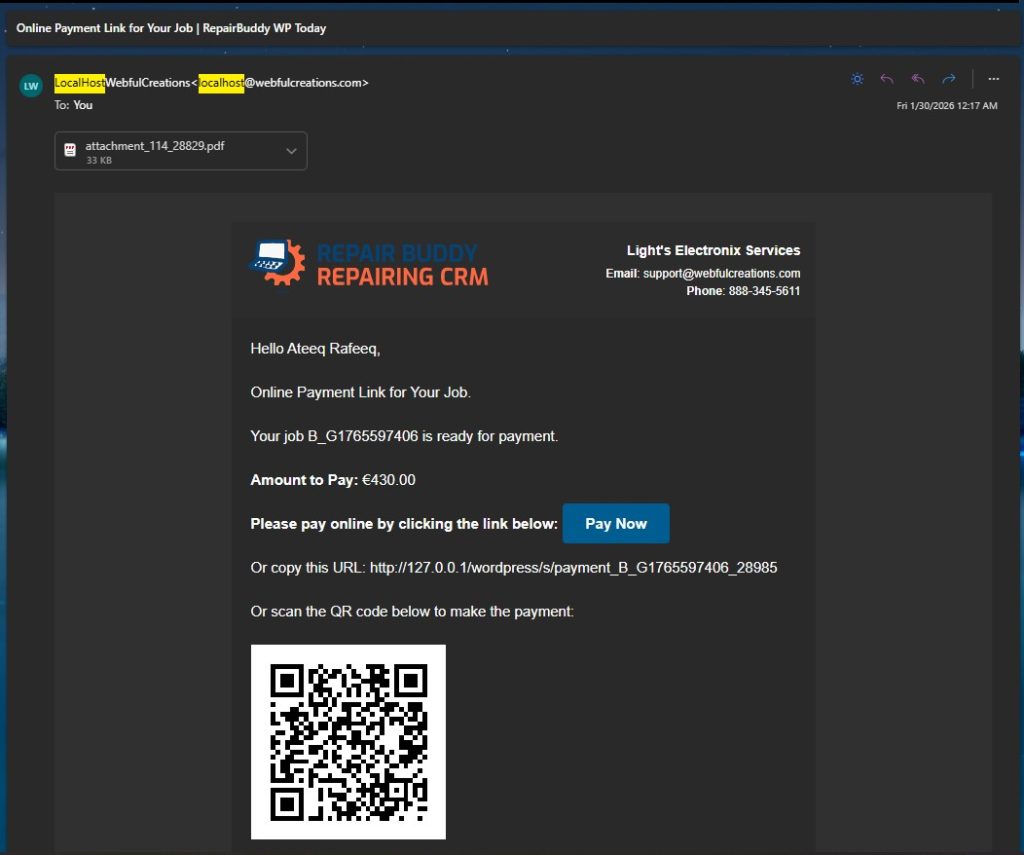
So once you set the job status to delivered an automated email with invoice attached and complete job history is sent to customer’s email or SMS if both are configured for notifications. Invoices should be:
- Automatically emailed when job status changes
- Attached to notification emails
- Available inside customer portal
8. Refund Tracking
A proper computer repair invoice software should also:
- Track refunds
- Log refund history
- Update invoice balance accordingly
9. Estimate-to-Invoice Conversion
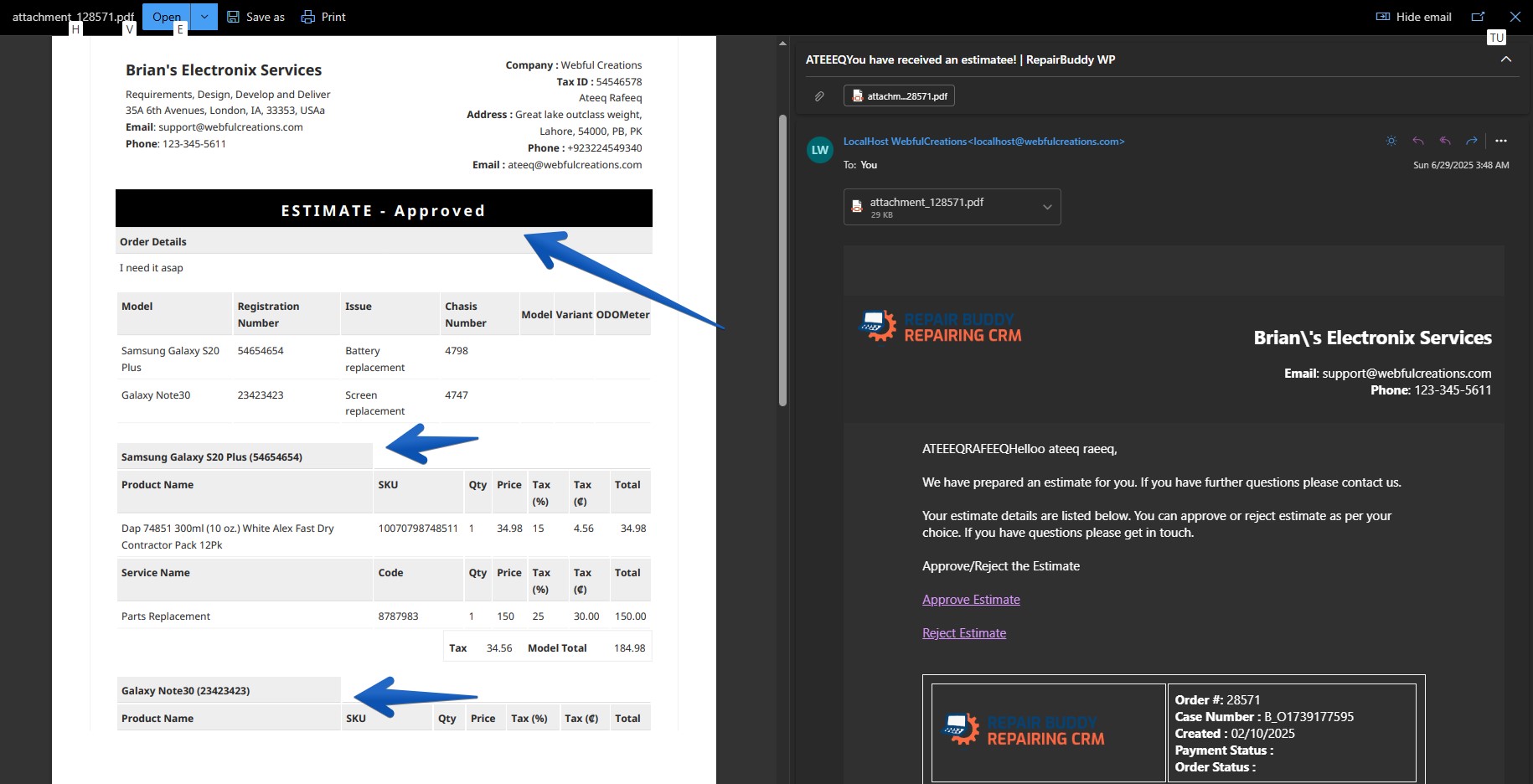
Repair shops frequently:
- Send an estimate
- Get customer approval
- Convert estimate to invoice
Estimates should work exactly like invoices — just with a different status.
Why Generic Invoice Software Fails Repair Businesses
Tools like basic accounting apps:
- Don’t connect invoices to jobs
- Don’t handle repair workflows
- Don’t integrate job status updates
- Don’t offer repair status checker access
- Don’t support warranty claim handling
- Require manual reconciliation
This leads to:
- Accounting errors
- Payment confusion
- Customer frustration
- Staff inefficiency
Repair businesses need more than invoicing.
They need a repair shop invoice system.
Introducing RepairBuddy – Invoicing Built for Real Repair Shops
RepairBuddy is not generic invoice software.
It’s a complete repair shop CRM and booking system with a powerful invoicing engine built specifically for repair businesses.
RepairBuddy includes a dedicated repair job invoice software module that connects invoices directly to repair tickets, parts, labor, taxes, and payment tracking — eliminating manual reconciliation and billing confusion.
It supports:
✔ Custom invoice numbers
✔ Multiple taxes (inclusive & exclusive)
✔ Job-based invoice attachment
✔ Partial payments tracking
✔ Multi-status payments (Paid, Pending, Partial & custom statuses)
✔ Payment history logs
✔ Refund tracking
✔ Estimate management
✔ Automatic invoice emailing
✔ Payment link inside invoice
✔ Printable & downloadable PDFs
✔ Customer portal access
✔ Access via repair status checker
How RepairBuddy Handles Payments
RepairBuddy allows:
- Cash payments
- Online payments
- Partial payments
- Combined payment methods
You can configure WooCommerce for payments, which means:
- Stripe
- PayPal
- Any WooCommerce-supported gateway
The invoice includes a payment link until the balance is fully paid.
Once paid, the link disappears automatically and invoice status changes to “Paid.”
If you want to understand how repair businesses can combine offline and online billing smoothly, here’s a detailed guide on how repair shops can accept cash and partial online payments in one system without using separate tools.
This reduces confusion and prevents duplicate payments.
Computer Repair Invoice Software That Fits Real Workflow
As you know computer repair shop owners are mostly technicians, they aren’t great accountants. So RepairBuddy is very helpful for such repairing businesses to automate their invoicing workflow and reduce the risk of losing revenue or tax details. For computer repair shops, invoicing often involves:
- Hardware parts
- Labor charges
- Diagnostic fees
- Data recovery charges
- Multiple tax applications
RepairBuddy acts as true computer repair invoice software because it:
- Links every invoice directly to the repair ticket
- Tracks partial payments for long repair jobs
- Sends automatic invoice updates when job status changes
- Keeps full payment history logs
This makes it ideal for:
- Computer repair businesses
- Mobile phone repair shops
- Electronics repair centers
- Multi-service repair companies
- Warranty repair centers
QuickBooks Integration
Since RepairBuddy provides a complete system for tracking jobs, payments, invoices, and contactless payment links (including SMS, Apple Pay, and Google Pay), you might wonder: “Why would a business still need a QuickBooks integration?”
The answer is simple: Scalability and Professional Workflow.
A Real-World Case Study: The Handpiece Manufacturer
One of our clients is a specialized manufacturer of dental handpieces. Their business has two distinct needs:
- Manufacturing & Wholesale: They sell new units to a global network of wholesalers who are already set up in their QuickBooks system.
- Service & Warranty: They need to handle complex warranty claims and repair bookings for those same units.
While they use RepairBuddy to manage the technical “bench work”—tracking parts, technician labor, and warranty statuses—their accounting department requires all final payments to go through their existing QuickBooks wholesalers’ ledger.
By using our integration, they don’t have to choose between a great repair tool and their established accounting ecosystem. RepairBuddy handles the Repair Workflow, and QuickBooks handles the Corporate Ledger.
Key Benefits of the RepairBuddy + QuickBooks Sync:
- No Double Entry: Stop wasting hours manually typing invoice data from your repair shop into your accounting software.
- Accounting Accuracy: Ensure your tax reporting and financial statements are always “CPA-ready” by syncing your repair revenue directly to your books.
- Wholesale Ready: Perfect for businesses that deal with both retail customers (via RepairBuddy) and B2B wholesalers (via QuickBooks).
- Streamlined Bookkeeping: Keep your technical repair logs detailed and separate while keeping your financial records clean and professional.
The Bottom Line: RepairBuddy is a complete, standalone accounting system for most repair shops. But for businesses that require high-level financial integrations, we ensure you have the tools to connect your repair bench to your front office seamlessly.
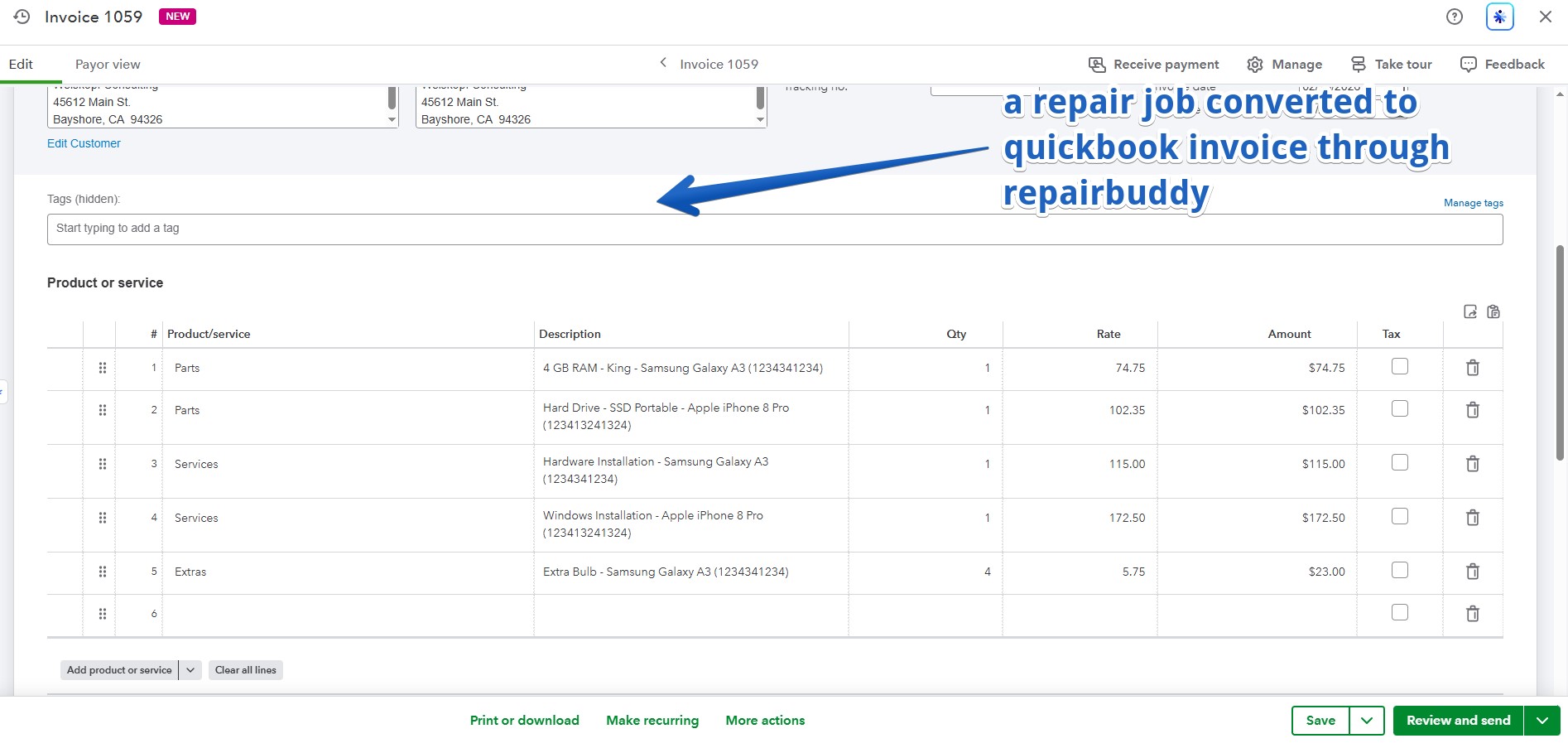
For accounting needs, RepairBuddy integrates with:
- QuickBooks
This allows repair businesses to:
- Maintain accounting accuracy
- Sync financial data
- Keep bookkeeping streamlined
Comparison: Generic Invoice Tools vs RepairBuddy
| Feature | Generic Invoice Software | RepairBuddy |
|---|---|---|
| Job-based billing | ❌ | ✔ |
| Repair workflow integration | ❌ | ✔ |
| Partial payment tracking | Limited | ✔ Full |
| Custom payment statuses | ❌ | ✔ |
| Online payment link | Limited | ✔ |
| Estimate management | Basic | ✔ Repair-focused |
| Warranty handling | ❌ | ✔ |
| Customer portal invoice access | ❌ | ✔ |
| Repair status checker access | ❌ | ✔ |
Who Should Use Repair-Specific Invoicing Tools?
Repair shops that:
- Handle multiple jobs daily
- Offer deposits or partial payments
- Need automated communication
- Want online payment capability
- Need accurate tax management
- Want invoices linked directly to jobs
If your repair business is growing, generic invoice tools will slow you down.
FAQs – Invoicing Tools for Repair Services
What is the best invoicing tool for repair services?
The best tool is one built specifically for repair workflows, offering job-based billing, partial payments, tax flexibility, and online payments — not just simple invoice generation.
Can repair shops accept partial payments on invoices?
Yes. Advanced repair shop invoicing software allows tracking deposits, remaining balance, and payment history.
What is computer repair invoice software?
It’s invoicing software specifically designed for computer repair businesses, connecting invoices to repair tickets, parts, labor, and payment tracking.
Do invoicing tools support multiple taxes?
Yes. Professional systems allow inclusive and exclusive tax configuration with multiple tax rates.
Final Thoughts
Invoicing tools for repair services must go beyond simple billing.
They must connect:
Jobs → Estimates → Invoices → Payments → Refunds → Accounting
RepairBuddy provides a complete repair business invoice system designed specifically for real repair shops.
If you’re serious about upgrading your repair shop invoicing software, using a system built for your workflow makes all the difference.